Guide
How to make products easier for AI agents to buy
Take away what stops an agent at the cart: a required account, a bot check, and a price that changes between the page and the checkout. Then give agents a checkout they can call, where the shopper confirms the payment.
Run the free reportA price that moved overnight
In October, one of our test purchases went wrong in the most ordinary way. The store had raised a price hours earlier in a bulk edit. The agent quoted the old price, and the store's own checkout asked for the new one.
Prices drift for ordinary reasons: a sale ends, a bulk edit runs, a feed refreshes overnight. A person shrugs and decides. An agent has to go back to the shopper, explain and ask again. Kifly now re-reads the live price before the shopper pays and asks them to confirm any new total, but the cleaner fix sits with the store: keep the cart price equal to the page price on the day you change it.
Five walls at the cart
Agents get further than most owners expect, then stop in the same few places. Each one is a setting or a habit, so start with whichever your store has.
Walls at the cart, and the fix
| Wall | What happens | Fix |
|---|---|---|
| An account required | Every benchmark run on such a store stopped early | Turn on guest checkout |
| A bot check | Agents are automated, so they fail a challenge like Turnstile | Do not show the check to verified agents |
| Page and cart prices differ | The agent quotes one total and the checkout asks for another | Keep the cart price equal to the page price |
| Price only in script | Agents that read the HTML never see it | Put price, stock and variants in the HTML |
| A discontinued product still listed | The agent offers something you cannot sell | Remove it from the sitemap and feeds |
Does every agent get as far?
No. At one large retailer's checkout, a16z found one agent reached the cart in every run while the other three were blocked in every attempt. A pass with one agent tells you little about the next, so test with at least two.
Reached the cart at one large retailer, by agent
How an agent can pay a small store
There are four ways today, and what separates them is who confirms the payment.
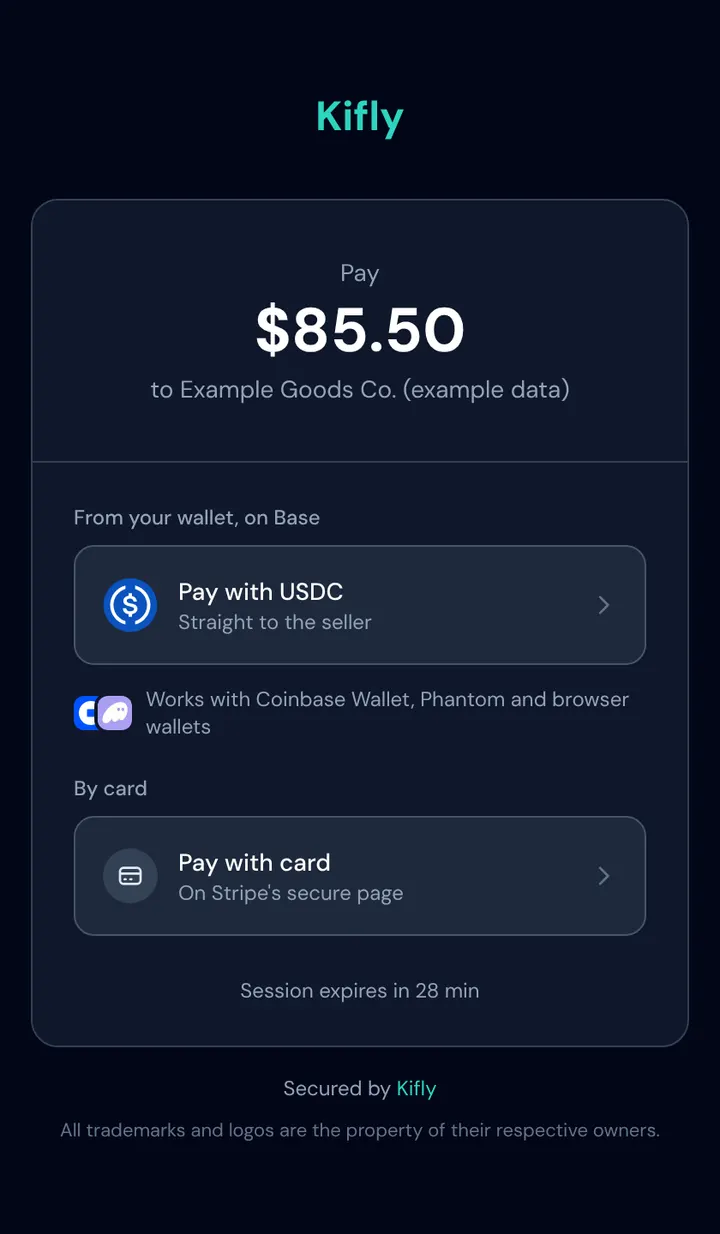
A browsing agent fills in your checkout form like a person, so it meets every wall above. A payment link moves the last step to the shopper: the agent searches and builds the cart, and the person who owns the card presses pay. a16z notes that wallets inside assistants are starting to launch. Agents that hold their own funds can pay by x402, signing each payment for one purchase.
Whichever you offer, the shopper should see your store's name, the total and the delivery before anything is charged. If you are unsure which of these your store supports today, the free report checks whether an agent has a way to buy, and the test-purchase guide shows how to try one yourself.
Ways an agent can pay
| Way | Who confirms | What you need |
|---|---|---|
| Your own checkout, filled in by a browsing agent | Whoever completes your form | Guest checkout and no bot check |
| A payment link the shopper confirms | The shopper, on a payment page | A checkout agents can call (UCP or MCP) |
| A wallet inside the assistant | The shopper, in the assistant | To accept that wallet's payments |
| An agent wallet paying by HTTP 402 (x402, USDC) | The agent, with a fresh signature each time | To accept stablecoin payments |
- Shopper
Find a waterproof dog jacket, medium, under $60, and buy it.
- Agent
search_products(q: "waterproof dog jacket", max_price: 60) - Kifly
Storm Shell Jacket, M, $54.00, in stock - Agent
get_policies(seller: "example-outdoor") - Kifly
Returns within 30 days. Free shipping over $50. - Agent
create_cart, add_to_cart, checkout - Kifly
Payment link: kifly.ai/pay/cs_example - Agent
Here is the $54.00 jacket. Open the link to confirm and pay.
- Shopper
Opens the link and taps Pay with card. Paid.
Where do you change it on your platform?
Guest checkout is the one setting every platform has. Bot protection sits with your host or CDN; Cloudflare's storefront guide covers that side, and so does our Cloudflare guide.
Checkout without an account
| Platform | Where to set it | Docs |
|---|---|---|
| Shopify | Settings, Checkout, Customer contact method: leave "Require customers to sign in to their account before checkout" off | Shopify Help: Checkout form options |
| WooCommerce | WooCommerce, Settings, Accounts and Privacy: tick "Enable guest checkout" | WooCommerce: Accounts and Privacy settings |
| BigCommerce | Settings, Checkout, Customer accounts: "Customers are not required to have an account to check out" | BigCommerce Help: Guest customers and checkout |
| Squarespace | Nothing to change: an account cannot be made required, and guests can always check out | Squarespace Help: Customer accounts |
| Wix | Keep the cart page's permission open to everyone, not Members Only | Wix Help: Requiring customers to sign up before making purchases (updated May 19, 2026) |
| Custom store | Your checkout code: let an order complete with an email and an address, no password |
A checklist to forward
- Turn on guest checkout.
- Let verified AI agents past your bot protection on product, cart and checkout pages.
- Keep the cart price equal to the page price, the same day you change it.
- Put price, stock and variants in the HTML, not only in script.
- Remove discontinued products from your sitemap and feeds.
- Try a purchase with two or more agents.
- Run the free readiness report to see whether an agent has a way to buy.
Where Kifly fits
Connect your Shopify or WooCommerce store, a product feed, or your store address, and Kifly gives agents a checkout they can call over UCP, MCP or REST. The agent builds the cart; the shopper confirms a payment link through Stripe or your own checkout page. Sellers who opt in also accept USDC on Base from agents that pay with x402.